WELCOME TO MOBILERELATION

How To Switch From iPhone To Android: iOS 26.3 New Data Transfer Features Explained


How To Switch From iPhone To Android: iOS 26.3 New Data Transfer Features Explained
When Switching From An iPhone To An Android Phone, The Biggest Hurdle Has Never Been The Device Itself, But How To Transfer Your Data. Photos Are Relatively Easy To Handle, But Messages, Notes, And App Settings Often Become Pain Points That Make The Process Feel Overwhelming.
The Good News Is That Apple Has Quietly Introduced A Brand-New Built-In Feature In iOS 26.3, Making The Data Transfer Process From iPhone To Android Feel Like A Native Experience. You Can Now Complete The Migration Without Downloading Any Additional Apps.
So How Exactly Does This Useful Feature Work? Let Us Walk You Through It.
What Is “Move To Android”?
“Move To Android” Is A New Built-In Device Migration Feature Introduced In iOS 26.3. It Allows Users To Transfer Important Data From An iPhone Directly To An Android Phone Without Relying On Any Third-Party Tools.
Integrated Directly Into The iOS System Settings, The Overall Workflow Is Very Similar To Switching From One iPhone To Another. It Supports The Transfer Of Photos, Messages, Notes, Contacts, Selected App Data, And Saved Passwords, Making Cross-Platform Switching Far Less Painful Than Before.
How To Use “Move To Android” In Practice
To Use The “Move To Android” Feature And Transfer Your Data From An iPhone To An Android Phone, You First Need To Update Your iPhone To iOS 26.3 (Currently Available In Beta). Once That’s Done, Simply Follow The Steps Below To Complete The Data Transfer With Ease.
Here’s How It Works:
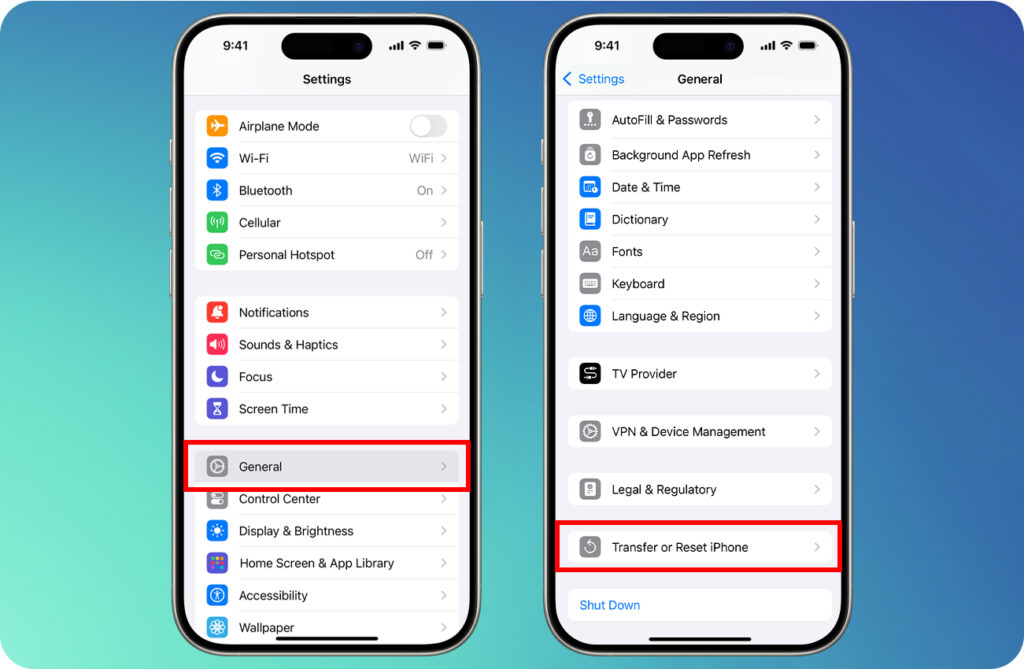
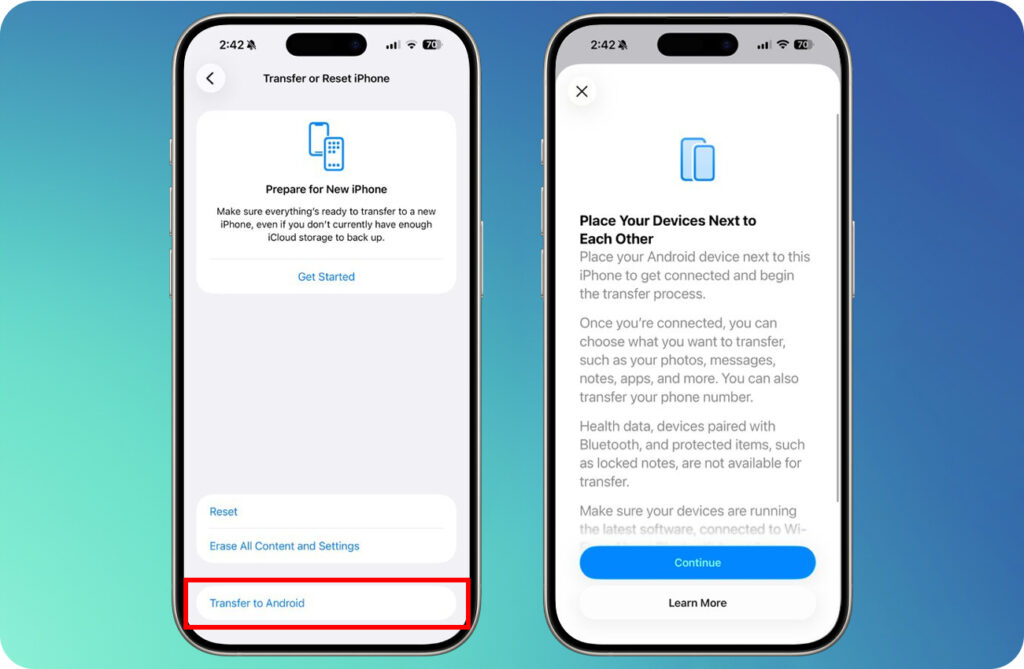
You Can Use Your iPhone To Scan The QR Code Displayed On Your Android Phone, Or Tap Other Options To Pair Using A Segment ID And Pairing Code. After That, You’re Ready To Start Transferring Your Data To Your Android Device!
Although The “Move To Android” Feature In iOS 26.3 Isn’t A Highly Publicized Highlight, It Is Extremely Practical For Users. This Feature Significantly Lowers The Barrier For iPhone Users Switching To Android, Allowing Those Curious About Android To Make The Move Without The Previous Hassle Of Data Transfer.
If You’re Considering Stepping Out Of The iPhone Ecosystem To Try An Android Device, Make Sure To Update To iOS 26.3 First, And Then Use This Feature To Easily Migrate Your Data!