WELCOME TO MOBILERELATION

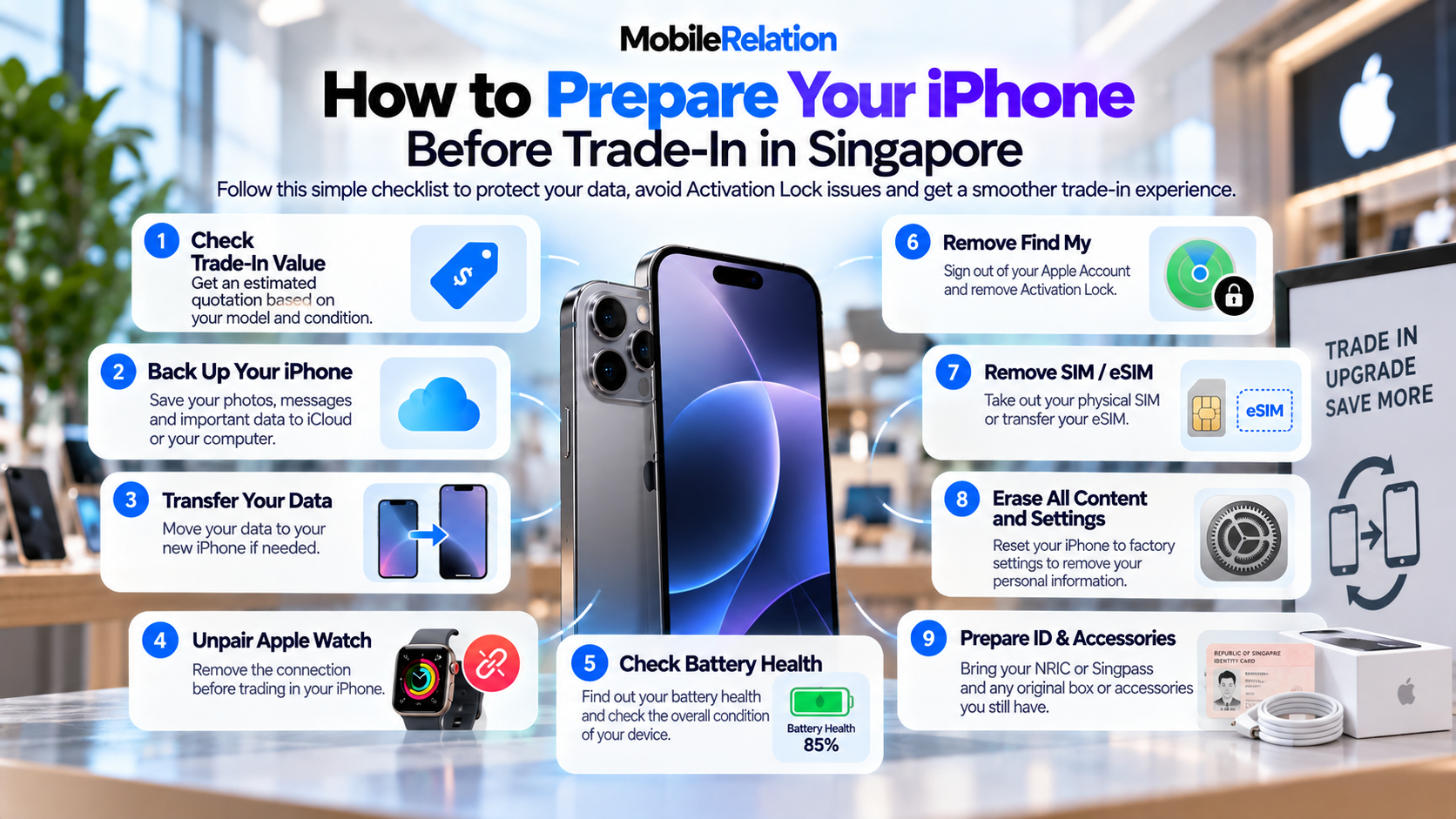
Planning to trade in your old iPhone?
Before handing over your device, there are a few important things you should do to protect your personal information, avoid Activation Lock problems and make the iPhone trade-in process smoother.
Preparing your iPhone properly is not only about performing a factory reset.
You should first back up your data, transfer anything you still need, check the condition of the phone, remove your Apple Account and Find My protection, handle your SIM or eSIM and only then erase the device.
This guide walks you through how to prepare your iPhone for trade-in in Singapore step by step, including what to check before visiting a MobileRelation outlet.
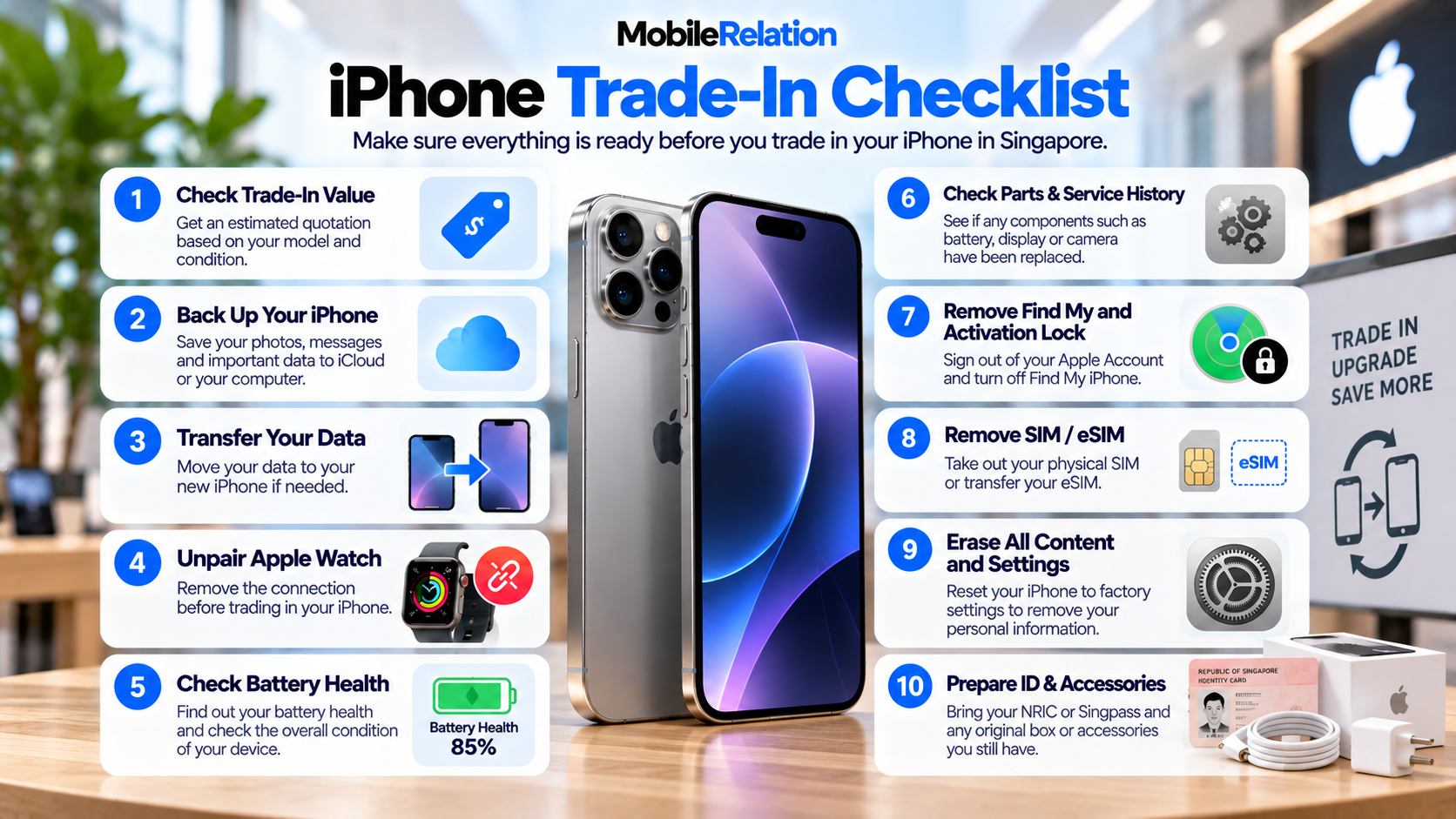
✅ iPhone Trade-In Checklist
| Step | What to Do |
|---|---|
| 1 | Check your current iPhone trade-in value |
| 2 | Back up your photos, messages and important data |
| 3 | Transfer your data to your new phone if needed |
| 4 | Unpair your Apple Watch |
| 5 | Check battery health and device condition |
| 6 | Check Parts & Service History if the iPhone was repaired |
| 7 | Sign out of your Apple Account and remove Find My protection |
| 8 | Transfer or remove your SIM / eSIM |
| 9 | Erase All Content and Settings |
| 10 | Prepare your ID and available accessories |
💰 1. Check Your iPhone Trade-In Value First
Before erasing anything, it makes sense to find out what your iPhone is currently worth.
MobileRelation’s online trade-in system allows you to select your iPhone model, storage capacity and condition to receive an estimated quotation.
For used iPhones, factors such as:
• Storage capacity
• Screen condition
• Housing condition
• Battery health
• Functional condition
• Accessories
• Current market demand
may affect the final value.
Check Your iPhone Trade-In Value
Select your iPhone model, storage and condition to see the current estimated quotation.
Check My iPhone Value☁️ 2. Back Up Your iPhone
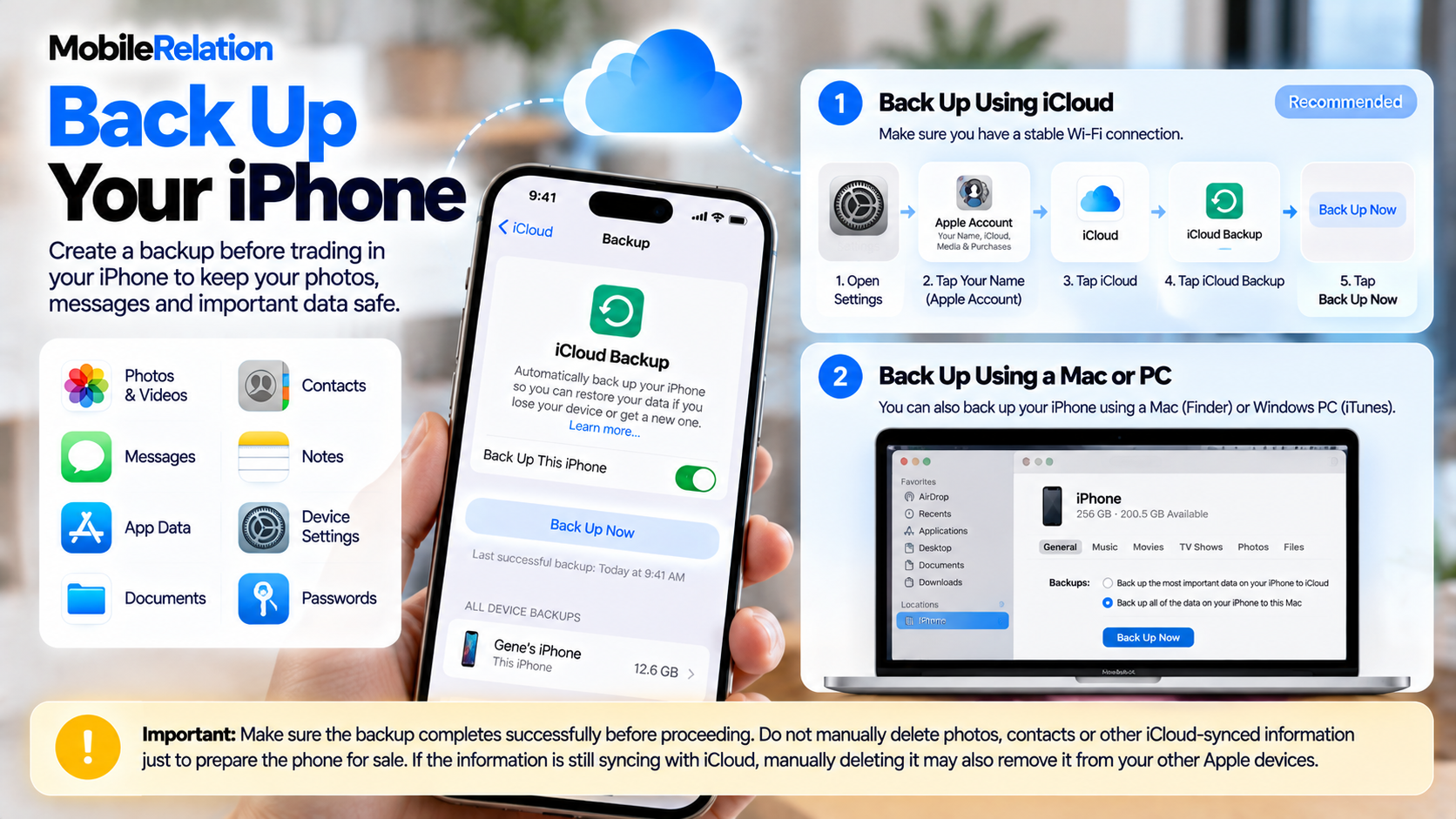
Before deleting anything, create a backup of your iPhone.
This protects important information such as:
• Photos and videos
• Messages
• Contacts
• App data
• Device settings
• Notes and documents
You can back up your iPhone using iCloud or a Mac / PC.
Back Up Using iCloud
Go to:
Settings → Your Name → iCloud → iCloud Backup → Back Up Now
Settings → Your Name → iCloud → iCloud Backup → Back Up Now
Make sure the backup completes successfully before moving on to the next step.
Important:
Do not manually delete photos,
contacts
or other iCloud-synced information
just to prepare the phone for sale.
If the information is still syncing with iCloud,
manually deleting it may also remove it
from your other Apple devices.
📲 3. Transfer Your Data to Your New iPhone
If you already have your replacement iPhone, transfer your data before erasing the old device.
Apple’s Quick Start system can help transfer information directly from your old iPhone to your new one.
Once the new phone is set up, check that your important information has transferred successfully.
Pay particular attention to:
• Photos
• Contacts
• WhatsApp or other messaging backups
• Banking apps
• Authenticator apps
• Notes
• Passwords
Do not erase your old iPhone until you are confident that everything important has been backed up or transferred.
⌚ 4. Unpair Your Apple Watch
If an Apple Watch is paired with the iPhone you are selling, unpair it before handing over the phone.
Unpairing your Apple Watch creates a backup of the watch and removes its connection from the old iPhone.
This makes it easier to pair the Apple Watch with your new iPhone later.
🔋 5. Check Battery Health Before Trade-In
Battery health can affect the trade-in value of supported used iPhones.
Checking it beforehand gives you a better understanding of the condition of your phone and the quotation you may receive.
For iPhone 15 and Later
Settings → Battery → Battery Health
For iPhone 14 and Earlier
Settings → Battery → Battery Health & Charging
For a more detailed explanation, read:
Does Battery Health Affect iPhone Trade-In Value in Singapore? →
🔍 6. Inspect the Screen and Housing
Before requesting your final quotation, inspect your iPhone carefully.
Check the Screen For:
• Light scratches
• Deep scratches
• Cracks
• Display lines
• Dead pixels
• Touchscreen problems
Check the Housing For:
• Light scratches
• Paint wear
• Deep scratches
• Dents
• Impact damage
Describe your phone as accurately as possible when using the online quotation system.
If your phone has damage, it may still qualify for trade-in.
Read our guide:
Can You Trade In a Damaged Phone in Singapore? →
🛠️ 7. Check Parts & Service History
If your iPhone has previously been repaired, it is worth checking its Parts & Service History.
Depending on the iPhone model and repair history, Settings may show information about replaced components such as the battery, display or camera.
Apple also recommends checking whether any repair shows Finish Repair before trading in a device.
If you see a repair that has not been completed, finish the repair process before handing over the iPhone.
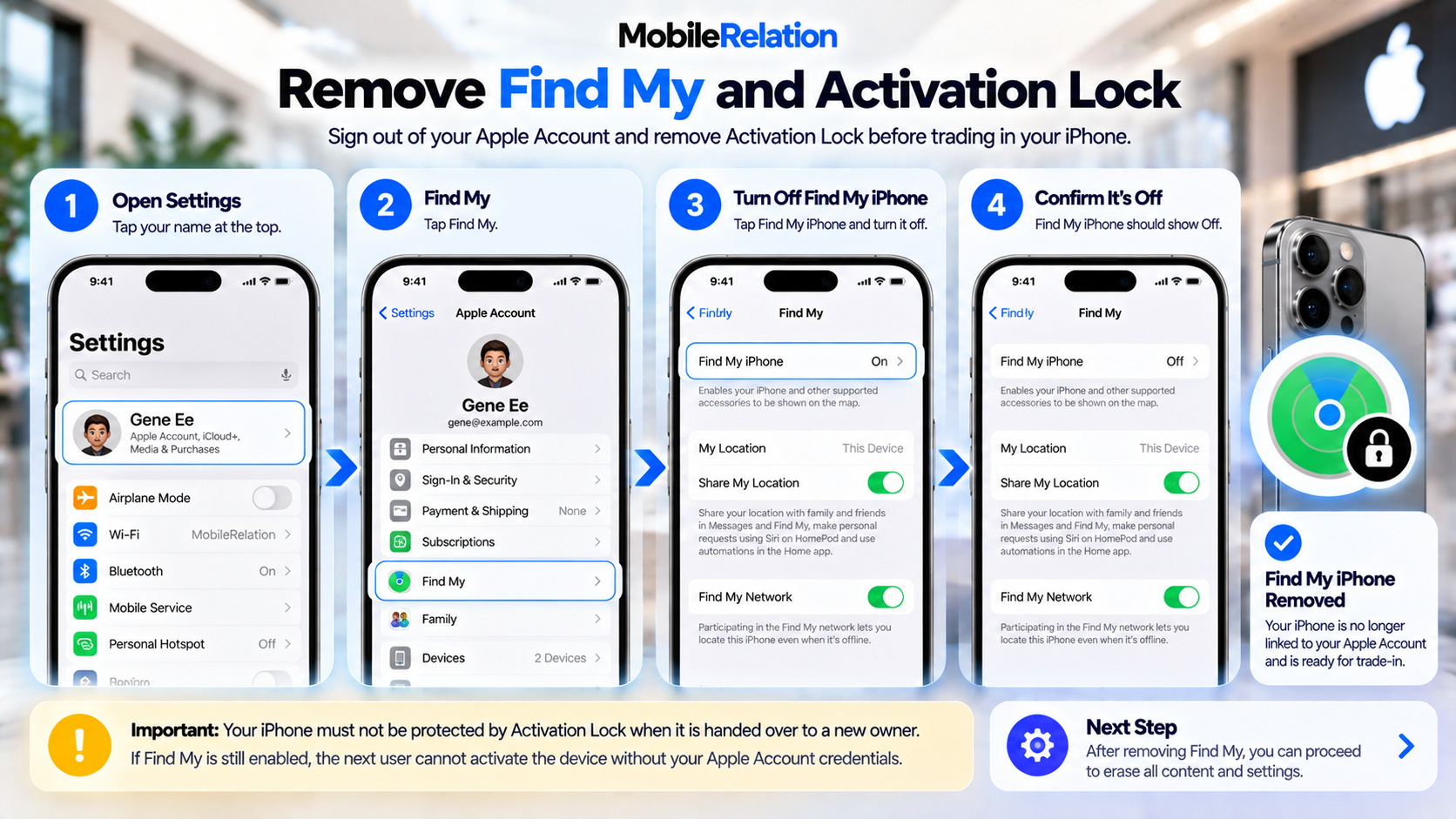
🔐 8. Remove Find My and Activation Lock
This is one of the most important steps.
Find My helps protect your iPhone by linking the device to your Apple Account.
When Find My is enabled, Activation Lock can prevent another person from activating the device without your Apple Account credentials.
Before the phone changes ownership, make sure it is no longer locked to your account.
Before handing over the device:
Sign out of your Apple Account and make sure Find My / Activation Lock is removed as part of the reset process.
Sign out of your Apple Account and make sure Find My / Activation Lock is removed as part of the reset process.
If you already sold or handed over the iPhone and forgot to remove it, Apple allows you to erase the device and remove it from your account using Find My / iCloud.
📶 9. Remove or Transfer Your SIM / eSIM
Do not forget about your mobile service.
Physical SIM
If your iPhone uses a physical SIM card, remove the SIM card before handing over the device.
eSIM
If you use eSIM, make sure your mobile number has been transferred to your new device or follow your telco’s instructions for removing or suspending the old eSIM.
Do this before you permanently erase and hand over the old phone.
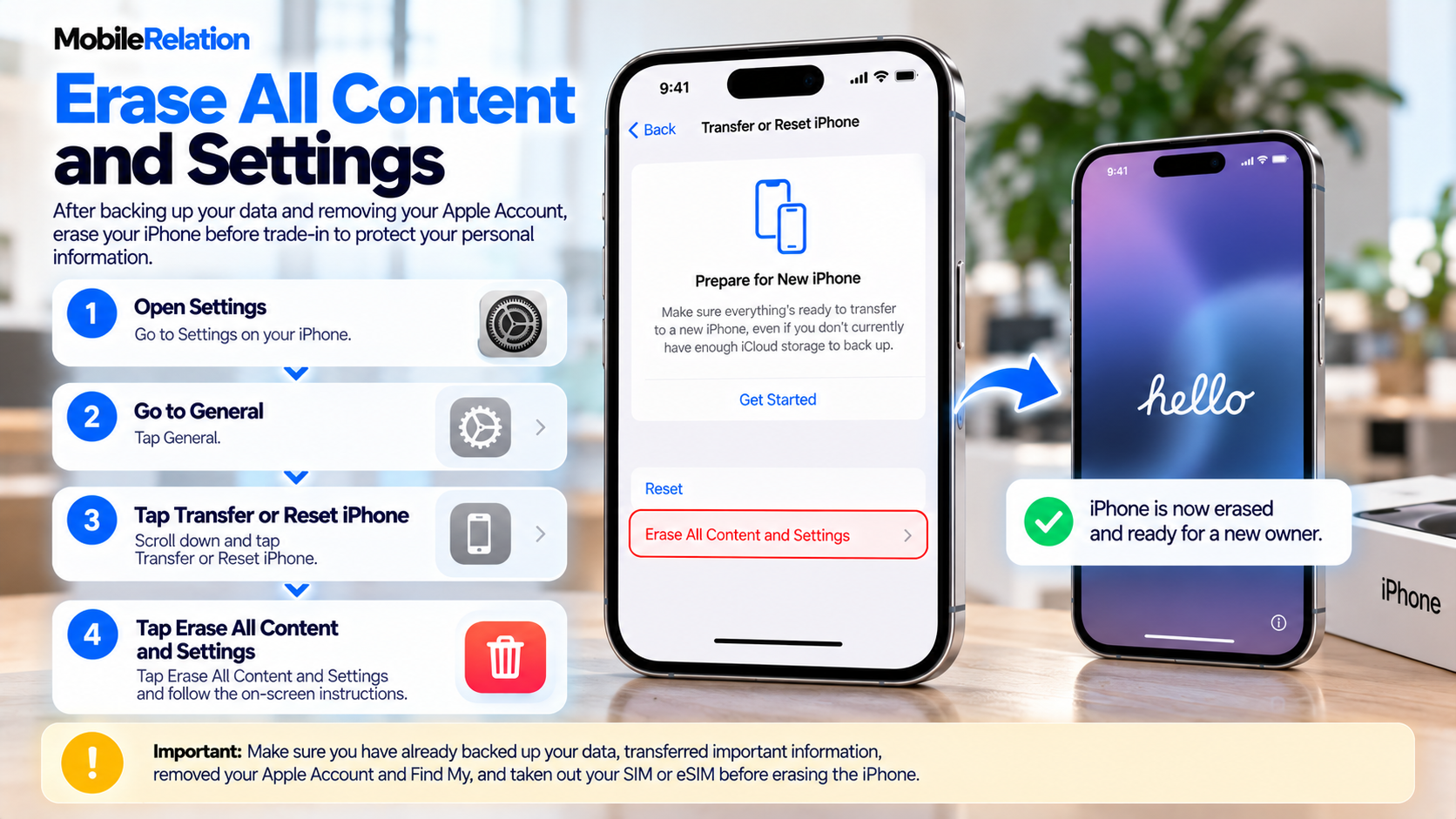
🧹 10. Erase All Content and Settings
Once your backup, data transfer, Apple Watch and mobile service have been taken care of, you can erase the iPhone.
Apple also explains this in its official guide on what to do before you sell, give away or trade in your iPhone. To erase your iPhone:
Go to:
Settings → General → Transfer or Reset iPhone → Erase All Content and Settings
Settings → General → Transfer or Reset iPhone → Erase All Content and Settings
Follow the on-screen instructions.
You may be asked to enter your passcode and Apple Account password.
After the reset is complete, the iPhone should return to the setup screen.
Do not continue setting up the phone again if you are preparing it for a new owner.
📦 11. Gather the Box and Accessories You Still Have
If you still have the original iPhone box, charging cable or other included accessories, keep them together before heading to the outlet.
MobileRelation’s trade-in assessment may consider available original accessories and packaging as part of the overall valuation.
Do not worry if you no longer have everything.
You can still check whether your phone qualifies based on your actual device and available accessories.
🪪 12. Prepare Your Identification
Phone trade-in transactions in Singapore may require seller identity verification.
MobileRelation requires a valid NRIC or Singpass for record-keeping and performs mandatory IMEI screening during the trade-in process.
Make sure you have the required identification available when completing your transaction.
⚠️ What Should You NOT Do Before Trading In Your iPhone?
Don’t Erase the Phone Before Backing It Up
Once important information is erased without a backup, recovering it may be difficult or impossible.
Don’t Forget Find My
An iPhone that remains Activation Locked cannot easily be prepared for a new owner.
Don’t Leave Your SIM Card Inside
Remove your physical SIM before handing over the phone.
Don’t Guess the Device Condition
Inspect the device carefully and select the condition that most accurately describes it.
Don’t Pay for Repairs Without Checking the Trade-In Value First
If your iPhone is scratched, damaged or has low battery health, check its current as-is value first.
The cost of repairing the device may be higher than the additional trade-in value you would gain.
♻️ How iPhone Trade-In Works at MobileRelation
| Step | Process |
|---|---|
| 1. Get Your Quote | Choose your iPhone model, storage and condition online. |
| 2. Drop-Off / Pick-Up | Visit a MobileRelation outlet or use an available collection option. |
| 3. Device Verification | The device is inspected to verify condition, functionality and eligibility. |
| 4. Payout | Payment is completed after final verification and assessment. |
📚 Want to Understand Your iPhone’s Trade-In Value?
Preparing your iPhone properly makes the transaction smoother, but the value of the device still depends on factors such as:
model, storage, battery health, screen condition, housing condition and market demand.
Read our complete guide:
How Much Is My Phone Worth in Singapore? 2026 Trade-In Value Guide →
❓ iPhone Trade-In FAQs
What should I do before trading in my iPhone?
Back up your data, transfer important information, unpair your Apple Watch, check the phone’s condition, remove your Apple Account and Find My protection, transfer or remove your SIM or eSIM, and erase all content and settings before handing over the device.
Do I need to erase my iPhone before trade-in?
Yes. Your personal data should be removed before ownership of the device changes. Back up and transfer your information first, then use Erase All Content and Settings.
Do I need to turn off Find My iPhone before trade-in?
The phone should no longer be protected by your Activation Lock when it is handed over to a new owner. Properly signing out and erasing the device removes the connection to your Apple Account.
Should I remove my SIM before trading in my iPhone?
Yes. Remove a physical SIM card before handing over the device. If you use eSIM, transfer your mobile service or follow your telco’s instructions before erasing the old iPhone.
Should I unpair my Apple Watch before selling my iPhone?
Yes. If an Apple Watch is paired with the iPhone, unpair it before selling or trading in the phone.
Should I replace my iPhone battery before trade-in?
Not necessarily. Check the phone’s current trade-in value first and compare any battery-related deduction with the cost of battery replacement.
Can I trade in a scratched or damaged iPhone?
Yes. Some iPhones with scratches, battery issues or certain defects may still qualify. The final value depends on the phone’s actual condition and inspection.
What identification do I need for phone trade-in in Singapore?
MobileRelation requires valid NRIC or Singpass for seller identity verification and record-keeping. IMEI screening is also performed as part of the trade-in process.
Ready to Trade In Your iPhone?
Check your current iPhone value based on its model, storage and condition before visiting an outlet.
Check My iPhone Value🏁 Final Thoughts
Preparing for an iPhone trade-in only takes a few steps, but doing them in the correct order is important.
Start by checking the phone’s value, then back up and transfer your data, inspect the device, unpair connected Apple devices, remove your Apple Account protection and mobile service, and finally erase the iPhone before handing it over.
This protects your personal information and helps make the trade-in process smoother for both you and the next owner.