WELCOME TO MOBILERELATION

Can You Trade In a Damaged Google Pixel in Singapore?

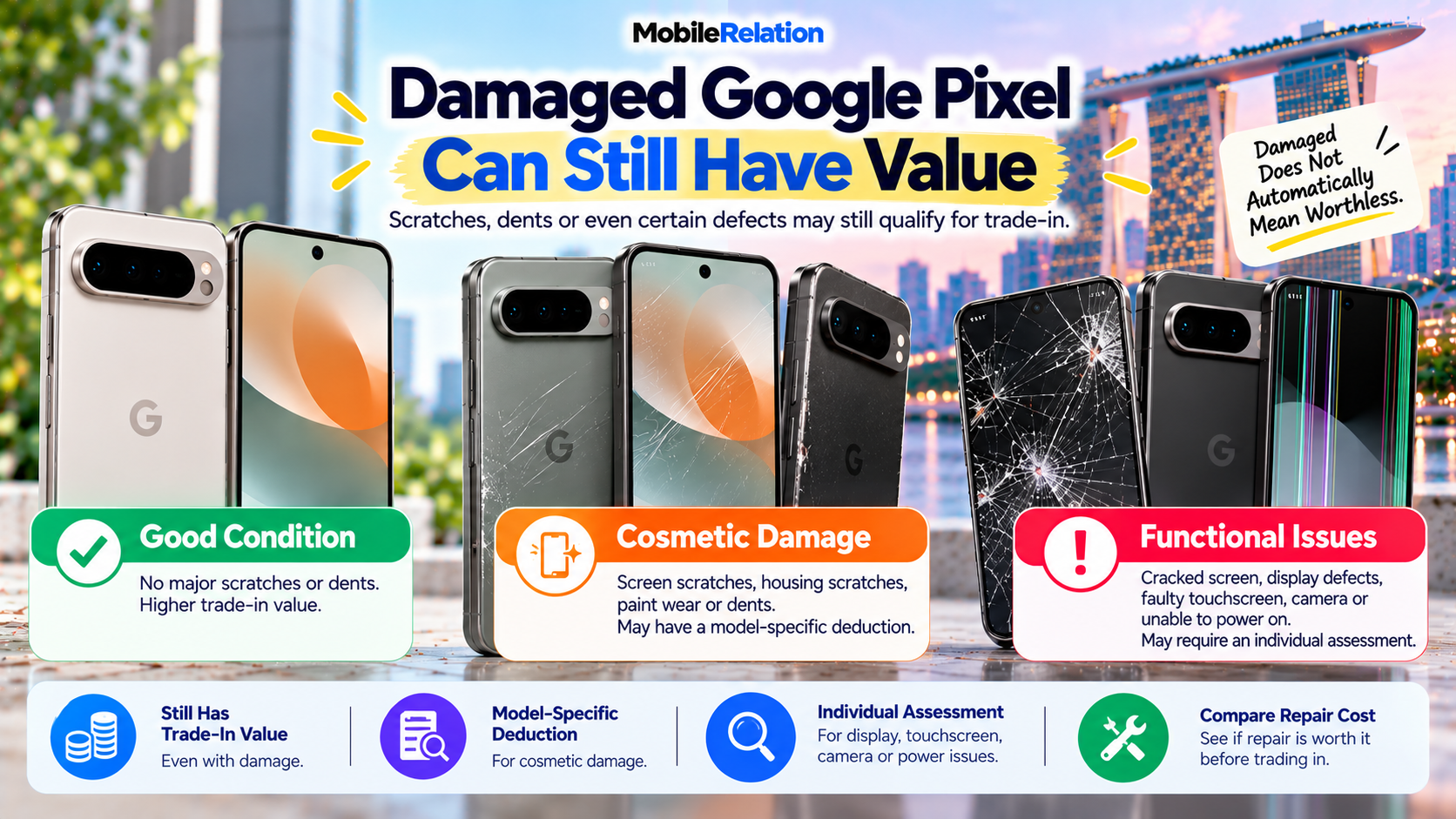
Can You Trade In a Damaged Google Pixel in Singapore?
Dropped your Google Pixel?
Maybe the screen is scratched, the housing is dented, the glass is cracked or one of the phone’s functions is no longer working properly.
Before assuming the device is worthless, it may still be worth checking its trade-in value.
MobileRelation accepts phones in different physical conditions, and devices with cosmetic wear or certain defects may still qualify for trade-in.
However, not all types of damage are assessed in the same way.
Ordinary screen scratches may have a standard model-specific deduction, while a cracked display, faulty touchscreen, camera problem or phone that cannot power on may require an individual assessment.
In this guide, we explain whether you can trade in a damaged Google Pixel in Singapore, what different types of damage mean for your quotation, and whether repairing your Pixel before selling it actually makes financial sense.
💥 Can You Trade In a Damaged Google Pixel?
Potentially, yes.
Damage does not automatically mean a damaged Google Pixel has zero trade-in value.
Cosmetic wear such as:
• Light screen scratches
• Deep screen scratches
• Housing scratches
• Paint wear
• Dents
can already be represented in MobileRelation’s online Pixel quotation system.
More serious issues may require an individual assessment.
Damaged ≠ Worthless.
A damaged Google Pixel with scratches, dents or certain defects may still have trade-in value. The final quotation depends on the exact model, condition, functionality and verification.
A damaged Google Pixel with scratches, dents or certain defects may still have trade-in value. The final quotation depends on the exact model, condition, functionality and verification.
🔍 What Type of Damage Does Your Pixel Have?
Before requesting a quote, it helps to identify what kind of damage your phone actually has.
| Condition | Example | Quotation Approach |
|---|---|---|
| Light Screen Scratches | Small cosmetic scratches visible on the glass. | Model-specific deduction may apply. |
| Deep Screen Scratches | More visible or deeper surface scratches. | Larger model-specific deduction may apply. |
| Housing Scratches | Marks or paint wear on the frame or back. | Housing-condition deduction may apply. |
| Dents | Visible impact damage on the housing. | Larger housing deduction may apply. |
| Cracked Glass | Glass is physically cracked or chipped. | May require individual assessment. |
| Display Defect | Image, colours or display performance are abnormal. | Individual assessment may be required. |
| Touchscreen Fault | Touch input does not respond correctly. | Individual assessment may be required. |
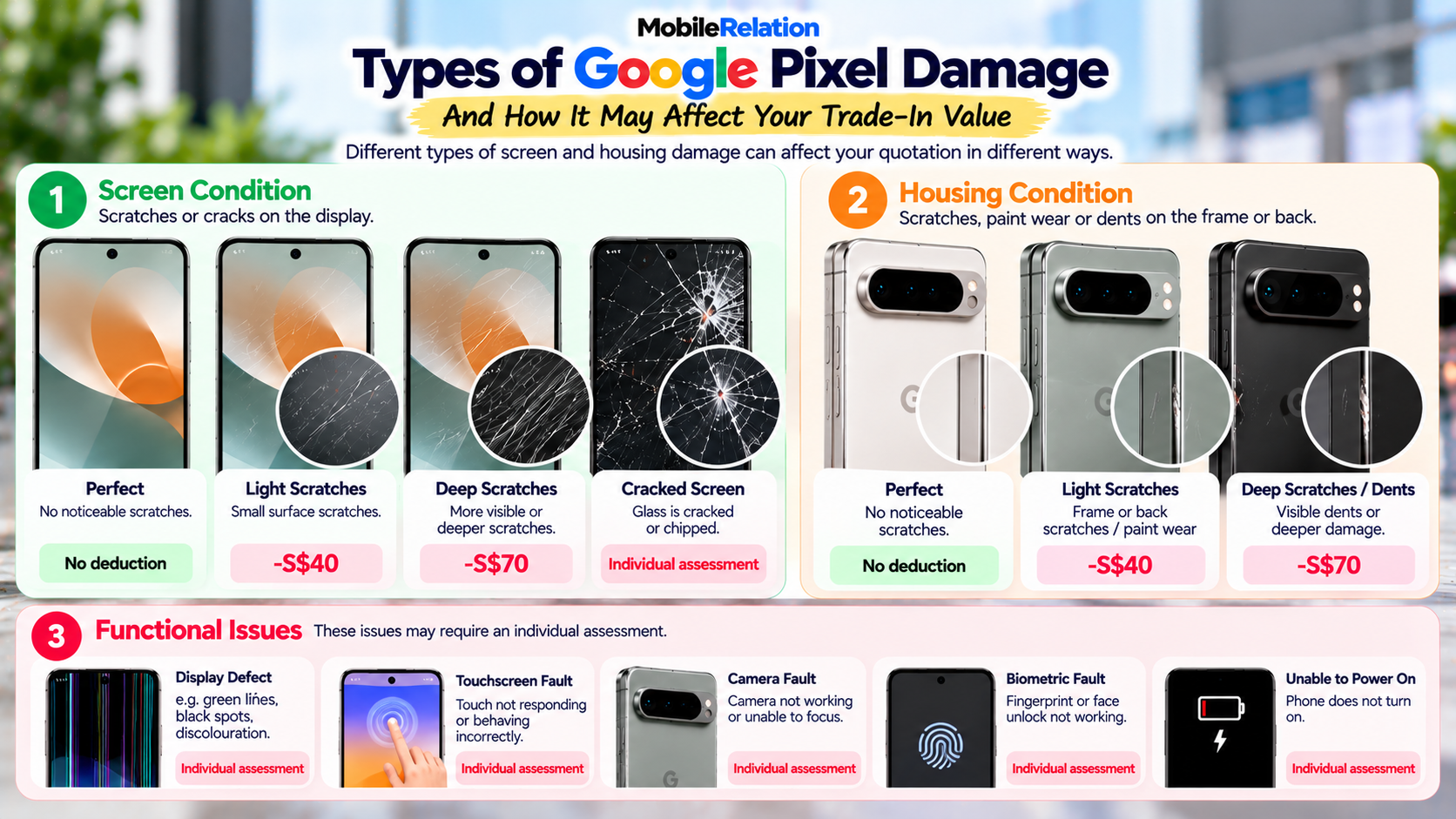
🕸️ Scratched Screen vs Cracked Screen: They Are Not the Same
This is one of the most important differences to understand when checking your Pixel’s condition.
A deep scratch is not automatically the same thing as cracked glass.
MobileRelation’s current online Pixel quotation flow provides standard options for:
• Perfect
• Light Scratches
• Deep Scratches
A physically cracked screen, however, can be a more serious form of damage.
If the crack affects the screen, display or touchscreen, an individual assessment may be needed.
Do not choose “Deep Scratches”
simply because
your screen is cracked.
Describe the actual damage
as accurately as possible
so the correct assessment
can be made.
📊 Real Example: Pixel 9 Pro Screen Damage
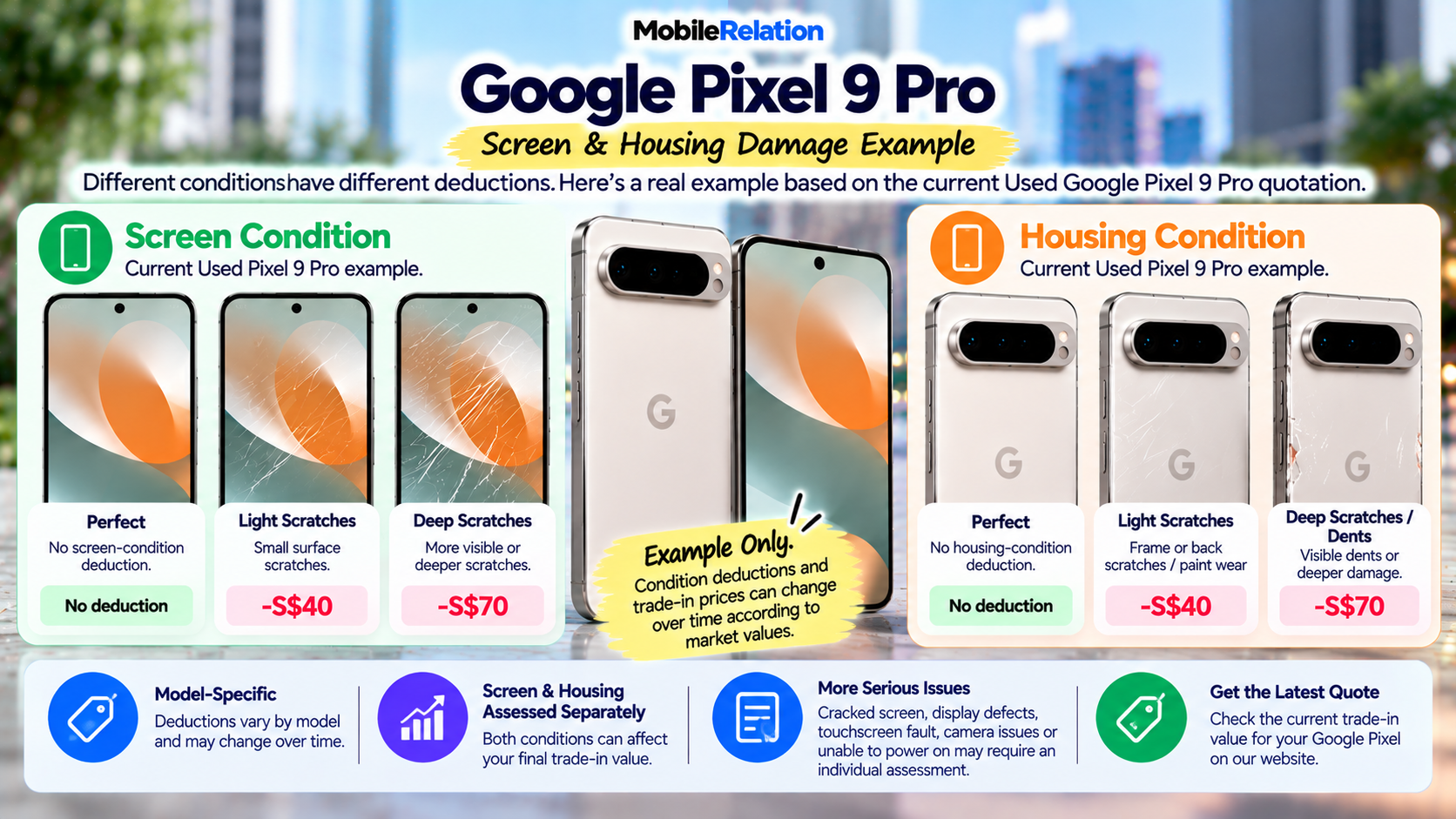
The current Used Google Pixel 9 Pro quotation provides different deductions according to screen condition.
| Screen Condition | Current Pixel 9 Pro Example |
|---|---|
| Perfect | No screen-condition deduction shown |
| Light Scratches | -S$40 |
| Deep Scratches | -S$70 |
These are current Pixel 9 Pro examples only.
Other Pixel models may have different condition deductions.
Example only:
Condition deductions and trade-in prices can change according to current market values.
Condition deductions and trade-in prices can change according to current market values.
📱 Housing Damage Can Reduce Your Pixel Value Too
Screen damage is not the only thing that matters.
MobileRelation assesses the Pixel’s housing separately.
The current Pixel 9 Pro example includes:
| Housing Condition | Current Pixel 9 Pro Example |
|---|---|
| Perfect | No housing-condition deduction shown |
| Light Scratches / Light Paint Peel | -S$40 |
| Deep Scratches / Dents | -S$70 |
This means a phone with a perfect display can still receive a condition adjustment if the housing is scratched or dented.
⚠️ What If Your Pixel Has Both Screen and Housing Damage?
It is possible for a phone to have damage in more than one area.
For example:
• Screen scratches
• AND housing scratches
or:
• Display damage
• AND a dented frame
Screen and housing condition are assessed separately in the quotation process.
Because the final value depends on the full condition of the device, describe all relevant damage accurately.
Do not assume that only the most obvious defect will matter.
🖥️ What If the Pixel Screen Is Cracked but Still Works?
A damaged Google Pixel can have cracked glass while the display image and touchscreen still appear to function.
That does not necessarily mean the device has no value.
However, a physical crack should still be disclosed.
The assessment may consider:
• Size of the crack
• Location of the crack
• Whether the glass is chipped
• Whether the display image is normal
• Whether touch works across the entire screen
• Whether the housing is also damaged
• Exact Google Pixel model
For actual cracked glass, contacting MobileRelation for an individual assessment can provide a more accurate quotation.
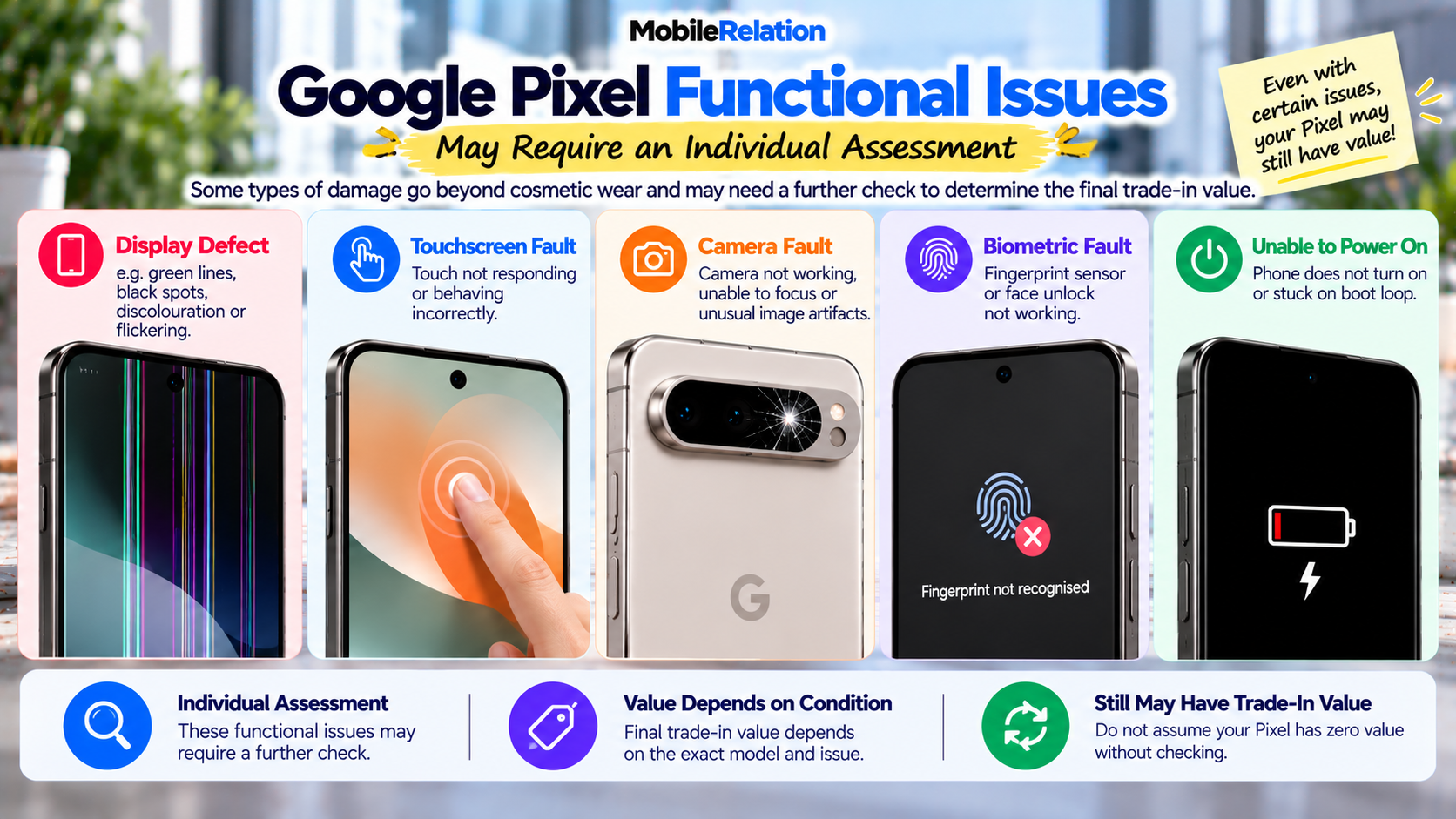
🌈 What If Your Google Pixel Has a Display Defect?
Display damage goes beyond scratches on the surface.
Examples may include:
• Coloured lines
• Green lines
• Black spots
• Dead pixels
• Discolouration
• Flickering
• Abnormally dim display
• Part of the screen not displaying correctly
MobileRelation’s current Pixel quotation flow lists Screen / Display defect as a functional issue.
This type of issue may require an individual assessment rather than a standard cosmetic deduction.
👆 What If the Pixel Touchscreen Is Faulty?
A damaged Google Pixel may display an image normally while the touchscreen does not behave correctly.
Possible touchscreen problems can include:
• Parts of the screen not responding
• Delayed touch response
• Incorrect or ghost touches
• Touch working only intermittently
• Touchscreen completely unresponsive
MobileRelation currently lists Touchscreen faulty separately in the Pixel quotation flow.
This may require further assessment.
🔐 What If Fingerprint or Face Unlock Does Not Work?
Biometric functionality is another part of the device assessment.
If your Pixel’s:
• Fingerprint sensor
• Face Unlock
does not function correctly, disclose the issue when requesting the quotation.
The current quotation system routes biometric issues for further assessment rather than showing a universal fixed deduction.
📷 What If the Google Pixel Camera Is Faulty?
Pixel phones are strongly associated with their camera capabilities, but camera hardware can still develop problems.
Examples may include:
• Camera not opening
• Camera unable to focus
• Damaged camera glass
• Unusual image artifacts
• Camera module malfunction
MobileRelation currently lists Camera faulty as a functional issue requiring further assessment.
⚫ What If Your Google Pixel Cannot Power On?
A phone that cannot power on is a much more serious issue than ordinary cosmetic wear.
MobileRelation’s current Google Pixel quotation flow specifically includes Unable to power on as a functional issue.
Instead of displaying a standard fixed deduction, the system directs the user toward further assessment.
So if your damaged Google Pixel no longer switches on, do not automatically assume that the value is zero.
Ask for an assessment of the exact device and condition.
📋 Cosmetic Damage vs Functional Damage
| Damage Type | Example | Typical Next Step |
|---|---|---|
| Cosmetic | Light screen scratches | Standard model-specific condition deduction may apply |
| Cosmetic | Deep screen scratches | Larger model-specific condition deduction may apply |
| Cosmetic | Housing scratches / paint wear | Housing-condition deduction may apply |
| Cosmetic / Physical | Dents | Housing-condition deduction may apply |
| Physical / Functional | Cracked screen | Individual assessment may be appropriate |
| Functional | Display defect | Further assessment |
| Functional | Touchscreen faulty | Further assessment |
| Functional | Biometric fault | Further assessment |
| Functional | Camera fault | Further assessment |
| Functional | Unable to power on | Further assessment |
🔧 Should You Repair a Damaged Google Pixel Before Trade-In?
Not automatically.
A repair can improve the condition of the device, but that does not mean the repair will always make financial sense.
The key question is:
Will the repair increase
the trade-in value
by more than
the repair costs?
A practical approach is to compare both options.
| Step | What to Do |
|---|---|
| 1 | Check the damaged Google Pixel’s current as-is trade-in value. |
| 2 | Find out the actual repair cost. |
| 3 | Estimate the possible post-repair trade-in value. |
| 4 | Compare the value increase with the repair cost. |
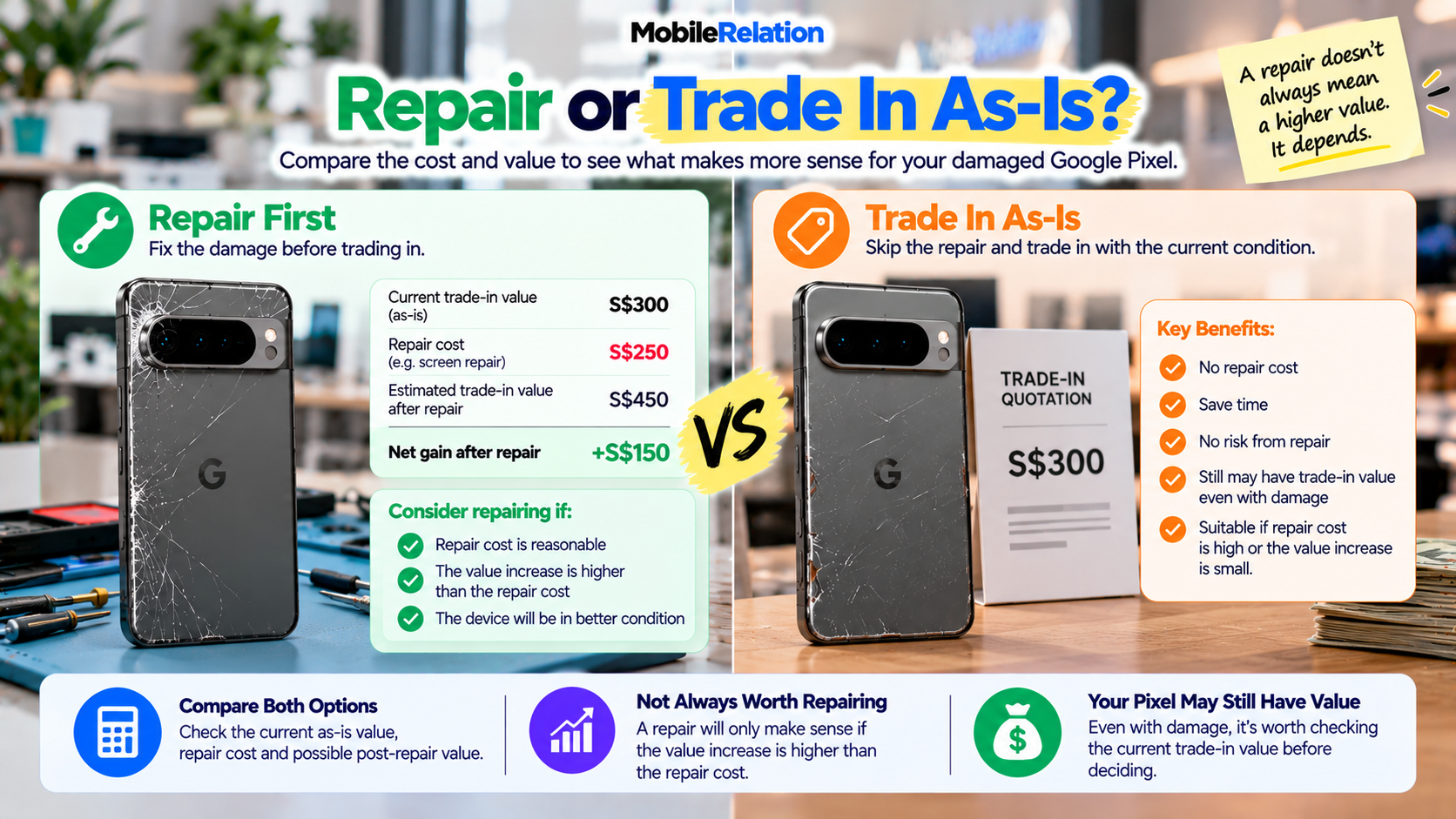
🧮 Example: Repair or Trade In As-Is?
Imagine a damaged Google Pixel is worth approximately S$300 in its current condition.
A repair costs S$250.
After repair, imagine the phone would be worth S$450.
In this hypothetical example, you spend S$250 but gain only S$150 in additional trade-in value.
Trading the phone in as-is may therefore make more financial sense.
Illustration only:
These are not actual MobileRelation quotations. Always compare the real repair cost and actual current quotation for your exact Pixel.
These are not actual MobileRelation quotations. Always compare the real repair cost and actual current quotation for your exact Pixel.
📦 What About the Original Pixel Box and Charging Cable?
Damage is not the only thing checked during the quotation process.
MobileRelation also asks whether working original accessories are available.
These include:
• Original box
• Charging cable
If you still have them, keep them together when preparing your Pixel for assessment.
🔒 Some Devices May Still Be Ineligible for Trade-In
Physical damage is different from device eligibility.
MobileRelation’s current trade-in terms state that network- or SIM-locked devices are not accepted.
The device must also legally belong to the seller.
Identity verification and IMEI screening are completed as part of the trade-in process.
🔐 Remove Your Personal Data Before Handing Over Your Pixel
If you decide to proceed with the trade-in, remember to remove your personal information.
Before handing over the phone:
• Back up important photos and files
• Transfer data to your new phone if needed
• Remove your Google Account
• Remove screen locks and security features
• Remove your physical SIM
• Transfer or manage your eSIM
• Factory reset the device when appropriate
Make sure your important information has been safely transferred before erasing anything. Google’s official guide on how to factory reset your Pixel phone explains how to erase the device.
💰 How Do You Get a Quote for a Damaged Google Pixel?
Start by selecting the exact Google Pixel model in MobileRelation’s online trade-in system.
Then choose:
• Storage capacity
• Colour
• Screen condition
• Housing condition
• Original accessories
• Functional condition
If your Pixel has a more serious issue that cannot be represented accurately using the standard condition options, request an individual assessment.
Damaged Pixel? Check What It’s Worth
Select your Google Pixel model and actual condition to check its current estimated trade-in value.
Check My Google Pixel Value📚 What Else Affects Google Pixel Trade-In Value?
Damage is only one part of a Google Pixel valuation.
Your:
model, storage, accessories, physical condition, functionality and current market demand can all influence the final value.
Read our complete Pixel guide:
What Affects Google Pixel Trade-In Value in Singapore? →
📱 Trading In Another Damaged Phone?
The same general idea also applies to other smartphone brands.
Read:
Can You Trade In a Damaged Phone in Singapore? →
❓ Frequently Asked Questions
Can I trade in a damaged Google Pixel?
Potentially. A damaged Google Pixel with cosmetic wear or certain defects may still qualify for trade-in. Final value depends on the exact device and actual condition.
Can I trade in a Google Pixel with a cracked screen?
A damaged Google Pixel with cracked glass may still have value, but a cracked screen is different from ordinary scratches and may require an individual assessment.
Can I trade in a Google Pixel with scratches?
Yes. MobileRelation’s Pixel quotation flow includes standard options for light and deep screen scratches. Model-specific deductions may apply.
How much do Pixel 9 Pro screen scratches reduce the value?
At the time of writing, the current Used Pixel 9 Pro quotation shows a S$40 deduction for light screen scratches and S$70 for deep scratches. Values can change over time.
Do housing scratches affect Google Pixel trade-in value?
Yes. Housing condition is assessed separately from screen condition. Scratches, paint wear and dents on a damaged Google Pixel can affect the quotation.
Can I trade in a Pixel with a faulty touchscreen?
A damaged Google Pixel with a touchscreen fault may require an individual assessment. MobileRelation’s online quotation system lists touchscreen faults as a functional issue.
Can I sell a Google Pixel that won’t turn on?
A damaged Google Pixel that cannot power on requires further assessment. Do not automatically assume the phone has no value without checking first.
Should I repair my damaged Google Pixel before trading it in?
Not necessarily. Compare the repair cost with the possible increase in trade-in value before spending money on the repair.
Is the online quote for a damaged Google Pixel guaranteed?
No. Online quotations are provisional estimates. Final value depends on physical condition, functionality, eligibility, verification and current market pricing.
Your Damaged Google Pixel May Still Have Value
Scratched, dented or faulty? Check the exact model and condition before assuming your Pixel is worthless.
Check My Pixel Trade-In Value🏁 Final Thoughts
A damaged Google Pixel does not automatically have zero trade-in value.
Light scratches, deep scratches, housing wear and dents may already have model-specific condition deductions.
More serious problems such as cracked glass, display defects, touchscreen faults, biometric problems, camera faults or a device that cannot power on may require an individual assessment.
Before paying for an expensive repair, compare the Pixel’s current as-is value with the repair cost and possible post-repair value.
Most importantly, do not assume that a damaged Pixel is worthless without checking its actual trade-in value first.
Check your Google Pixel trade-in value with MobileRelation →