WELCOME TO MOBILERELATION

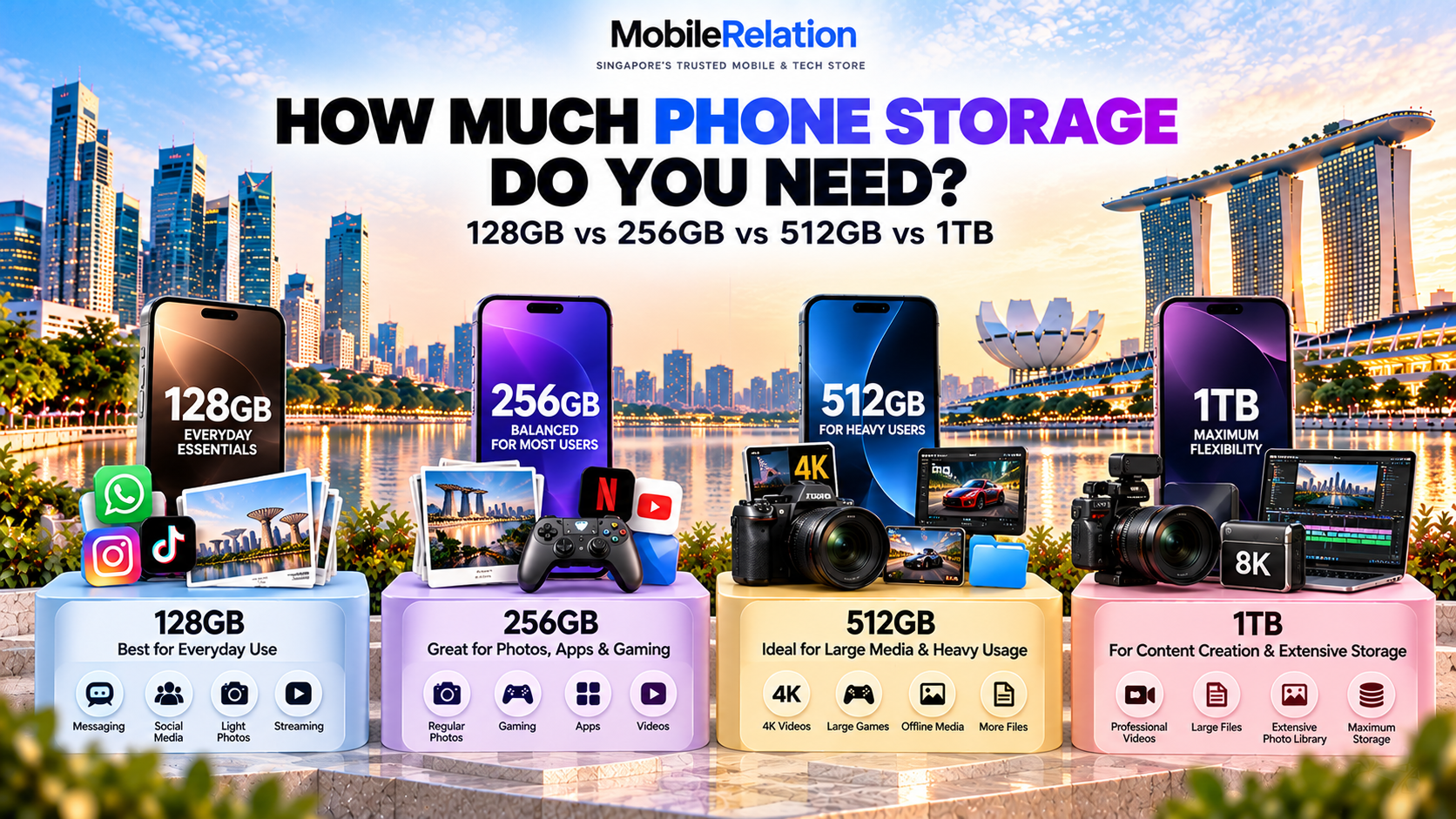
How Much Phone Storage Do You Need? 128GB vs 256GB vs 512GB vs 1TB
How much phone storage do I need? It is one of the most common questions people face when buying a new smartphone in Singapore.
Should you choose 128GB, upgrade to 256GB, go for 512GB or consider a massive 1TB of storage?
The answer depends on how you use your phone. Someone who mainly uses WhatsApp, social media and streaming apps will have very different storage requirements from someone who records 4K videos, downloads large games or creates content professionally.
In this guide, we compare 128GB vs 256GB vs 512GB vs 1TB, explain what actually uses smartphone storage and help you choose the right capacity for your next iPhone, Samsung Galaxy, Google Pixel or Android phone.
Quick answer: 128GB can be enough for lighter users, while 256GB is a practical starting point for many people who take photos, install games and plan to keep their phone for several years. Consider 512GB for larger media libraries and heavier usage, or 1TB for extensive local storage and demanding video workflows.
128GB vs 256GB vs 512GB vs 1TB: Quick Comparison
Before choosing a storage capacity, it helps to understand which option generally suits different usage habits.
| Storage | Best For | What to Consider |
|---|---|---|
| 128GB | Calls, messaging, social media and light photography | May require more regular storage management |
| 256GB | Everyday photography, apps, gaming and long-term use | A practical balance for many users |
| 512GB | Large games, frequent video recording and offline media | Useful if you prefer keeping more content locally |
| 1TB | Extensive video libraries, content creation and heavy local storage | May be unnecessary for ordinary daily use |
These are general recommendations, not fixed rules. Your current storage usage and future needs are much better indicators than the number alone.
Is 128GB Enough for a Phone?
128GB can still be enough for many smartphone users, especially those who mainly use their phones for everyday communication and entertainment.
If your typical activities include WhatsApp, Telegram, Facebook, Instagram, YouTube, Google Maps, banking apps and occasional photography, 128GB may provide adequate storage.
However, the entire advertised 128GB will not be available for personal files. The operating system, pre-installed software, app data and other system files also use storage space.
Who Should Choose 128GB?
- Users who mainly make calls and send messages
- People who stream music and videos instead of downloading them
- Light photographers who regularly back up their photos
- Users who install relatively few large games
- People who are comfortable managing storage occasionally
When Might 128GB Become a Problem?
Storage can fill up more quickly if you frequently record long videos, download movies, install large games or keep years of photos and messaging attachments on your phone.
If your existing 128GB phone is already close to full, choosing another 128GB device may leave you facing the same storage problem sooner than expected.
Our recommendation: Choose 128GB if your actual storage usage is comfortably below that capacity and you do not expect it to grow significantly.
Is 256GB Enough for a Smartphone?
For many buyers, 256GB is a practical balance between storage capacity and everyday convenience.
It gives you more room for photos, videos, applications, downloaded content and games without automatically moving to the largest storage options.
This additional capacity can be particularly useful if you prefer keeping your photos and files directly on your phone rather than relying entirely on cloud storage.
Who Should Choose 256GB?
- Users who take photos regularly
- People who install a variety of apps and mobile games
- Users who occasionally record 4K videos
- Those who download music, shows or movies for travel
- People planning to keep their smartphone for several years
For example, someone who frequently takes family photos, records short videos and uses several large apps may appreciate the extra space compared with a 128GB device.
However, 256GB is not automatically necessary for everyone. If your current phone has plenty of unused storage, a smaller capacity may still be suitable.
Our recommendation: If you are unsure which capacity to choose, 256GB is a sensible starting point to evaluate. Check your current usage before deciding.
Is 512GB Worth It for a Phone?
512GB becomes more useful when your smartphone is also your main camera, gaming device or portable media library.
Higher-resolution videos, downloaded games and large media collections can take up significant storage space over time.
For users who frequently record video, create content or prefer keeping files locally, 512GB may reduce the need for regular storage management.
Who Should Choose 512GB?
- Users who frequently record 4K videos
- Mobile gamers with several large games installed
- People who store extensive photo and video collections
- Users who download substantial offline content
- Content creators who edit and save videos on their phones
For example, a smartphone user who regularly records travel videos may prefer keeping the original footage on the device until it has been reviewed, edited and backed up.
In that situation, having 512GB can be useful because the phone has more room for both original footage and edited files.
However, higher capacity does not automatically mean that the phone has a better camera, faster processor or superior battery life.
Our recommendation: Consider 512GB if you regularly store large files or have already found 256GB restrictive.
Do You Really Need 1TB of Phone Storage?
1TB is generally intended for users with substantial local storage requirements.
For most everyday activities, including browsing, messaging, social media and streaming, 1TB is far more storage than necessary.
However, it can be valuable for people who regularly create large amounts of content.
Who Should Choose 1TB?
- Professional or frequent mobile video creators
- Users who retain extensive high-resolution video footage
- People managing very large local photo and media libraries
- Users who prefer keeping substantial files offline
- Anyone who regularly fills a 512GB smartphone
Some professional video formats can produce particularly large files, making additional local storage useful during recording and editing workflows.
Nevertheless, larger storage does not replace a proper backup strategy. Important photos, documents and videos should still be backed up separately.
Our recommendation: Choose 1TB because you have a clear need for it, not simply because it is the largest storage option available.
What Actually Uses Storage on Your Phone?
Understanding what consumes storage can help you make a better buying decision.
1. Photos
Every photo takes up storage, and the amount depends on factors such as resolution, image format and camera settings.
If you take many photos every day and keep the originals locally, your photo library can grow significantly over several years.
2. Videos
Video recording can use substantially more storage than ordinary photos.
Higher resolutions, higher frame rates and certain recording formats generally create larger files.
Someone who frequently records long 4K videos may need considerably more storage than someone who only records occasional short clips.
3. Mobile Games
Modern mobile games can include large graphics, audio files, downloadable resources and updates.
Users who keep multiple demanding games installed may benefit from additional storage capacity.
4. Messaging Apps
WhatsApp, Telegram and other messaging apps can accumulate photos, videos, voice messages, documents and cached content.
Even if the application itself is relatively small, its stored media and conversations may occupy significant space over time.
5. Offline Downloads
Downloaded movies, music playlists, podcasts, maps and other content all require local storage.
If you frequently travel or commute without reliable internet access, offline downloads may be an important part of your storage needs.
6. System Files and App Data
Your phone’s operating system, installed applications, updates and temporary files also require storage.
This is why the usable space on a new phone will be lower than its advertised storage capacity.
How to Check Your Current Phone Storage Before Buying
One of the easiest ways to choose the right storage capacity is to check how much space you are already using.
How to Check iPhone Storage
- Open Settings on your iPhone.
- Tap General.
- Select iPhone Storage.
- Review the amount of storage used and available.
- Check which apps and categories are using the most space.
For additional instructions, see Apple’s official iPhone storage guide.
How to Check Samsung Galaxy Storage
- Open Settings.
- Select Battery and device care or Device care.
- Tap Storage.
- Review your used and available capacity.
- Check which files and applications occupy the most space.
The exact menu names may vary depending on your Galaxy model and software version.
How to Check Google Pixel Storage
- Open Settings.
- Tap Storage.
- Review how much storage is being used.
- Open the categories to see which files and apps use the most space.
You can also follow Google’s official Pixel storage guide.
How to Decide How Much Storage You Need
Once you know your current storage usage, follow these three steps before choosing your next phone.
Step 1: Check How Much You Use Today
Start with the amount of storage currently occupied by your operating system, apps, photos, videos and other files.
For example, if you already use around 110GB on a 128GB phone, another 128GB device may not give you much room for future growth.
Step 2: Think About Your Future Usage
Consider whether you expect to take more photos, install additional games, record higher-resolution videos or download more content in the coming years.
Your future needs may be different from your current usage, especially if you are upgrading to a phone with more advanced camera capabilities.
Step 3: Leave Room for Growth
Avoid choosing a storage capacity that is already close to what you currently use.
Some extra space provides flexibility for application updates, temporary files, new photos and unexpected downloads.
For instance, if you are already approaching the limits of a 128GB phone and regularly record videos, evaluating a 256GB option is a reasonable next step.
Practical buying rule: Check current usage first, estimate how your habits may change, then choose a capacity with comfortable room to grow. Do not buy additional storage solely because a larger option exists.
128GB vs 256GB for iPhone: Which Should You Choose?
If you are choosing between two iPhone storage configurations, the most important consideration is how you use your camera, applications and local media.
128GB can work for users who mainly browse, message, stream content and take occasional photos.
256GB offers additional flexibility for users with larger photo libraries, more applications or a preference for keeping videos directly on their iPhones.
Apple’s iCloud Photos and storage optimisation features can help manage local storage, but they do not make device capacity irrelevant.
If you frequently work offline or record large amounts of video, local storage remains important.
Explore available Apple iPhones in Singapore to compare supported storage configurations across different models.
256GB vs 512GB for Samsung and Android Phones
For Samsung Galaxy, Google Pixel and other Android users, the decision between 256GB and 512GB largely depends on local media storage and application usage.
256GB is often enough for everyday photography, social media, common applications and moderate gaming.
512GB may be more suitable if you frequently record videos, maintain an extensive collection of offline media or install several large games.
Some Android phones support expandable storage through microSD cards, but many premium smartphones do not. Check the specific model before assuming its internal storage can be expanded.
Browse Samsung Galaxy phones or Google Pixel phones to compare available models and storage variants.
Does Cloud Storage Mean You Need Less Phone Storage?
Cloud services such as iCloud and Google Photos can help manage your phone’s local storage.
For example, supported optimisation features may keep smaller device versions of certain photos while storing the full-resolution originals in the cloud.
However, cloud storage and internal phone storage are not the same thing.
| Internal Phone Storage | Cloud Storage |
|---|---|
| Stores apps and local files directly on your device | Stores supported files and backups online |
| Local files can be available without internet access | Cloud-only files may require internet access |
| Fixed capacity determined by phone configuration | Capacity depends on service plan |
| Required for installed apps and system files | Cannot fully replace device storage |
Cloud storage may reduce how much local space you need, but it cannot replace the storage required for your operating system, installed applications and files you need offline.
Some cloud features also require a subscription depending on how much data you store.
Does More Phone Storage Make Your Phone Faster?
Choosing a 512GB phone instead of a 256GB phone does not automatically make the device faster.
Overall smartphone performance depends on factors such as the processor, RAM, storage technology, software optimisation and workload.
Storage capacity and RAM also perform different functions.
Storage is where applications, photos, videos and files are kept. RAM is working memory used by the operating system and running applications.
Keeping some free internal storage is useful because phones need space for updates, temporary files and other operations.
However, buying the largest storage option is not a substitute for choosing a smartphone with suitable performance for your needs.
Should You Buy More Storage If You Plan to Keep Your Phone for Years?
Keeping a phone for several years can make storage planning more important.
During that time, you may accumulate additional photos, videos, messages, downloads and applications.
Software and app requirements may also change.
If your current capacity is already close to full, choosing more storage for your next device can provide additional flexibility.
However, users who consistently maintain a small local media library and rely on streaming or cloud services may not need a major storage upgrade.
The best decision should be based on realistic usage rather than an assumption that everyone needs the largest capacity.
Which Phone Storage Capacity Should You Buy?
| Your Usage | Suggested Capacity to Consider |
|---|---|
| Messaging, calls and light social media | 128GB |
| Everyday photography and applications | 128GB or 256GB |
| Regular photos, some gaming and long-term use | 256GB |
| Large mobile games and frequent videos | 256GB or 512GB |
| Large offline media and extensive photo libraries | 512GB |
| Heavy video production and extensive local files | 512GB or 1TB |
Remember that not every smartphone offers every storage capacity. Available configurations vary by manufacturer, model and region.
Explore Smartphones by Brand in Singapore
Once you have decided how much storage you need, the next step is to compare smartphones that match your preferred operating system, camera requirements, performance and design.
You can explore the available range at MobileRelation:
- Browse Apple iPhones in Singapore
- Explore Samsung Galaxy Phones
- Shop Google Pixel Phones
- Browse All Smartphones in Singapore
Still deciding which smartphone to buy? Read our Top 20 Best Smartphones in Singapore 2026 guide for recommendations across different brands and user needs.
Find the Right Smartphone Storage at MobileRelation
The best phone storage capacity is not necessarily the largest one. It is the capacity that gives you enough space for your current needs and comfortable room for future use.
Whether you are considering an iPhone, Samsung Galaxy, Google Pixel or another Android smartphone, compare available storage configurations before deciding.
At MobileRelation, you can explore different smartphones, storage capacities, colours and device conditions through our online store.
Frequently Asked Questions
How much phone storage do I need?
The ideal capacity depends on your usage. 128GB may be enough for lighter users, 256GB is a practical starting point for many everyday users, 512GB is useful for larger games and media libraries, and 1TB suits users with extensive local storage requirements.
Is 128GB enough for a phone?
Yes, 128GB can be enough if you mainly use messaging, social media, streaming and light photography. Users who frequently record videos or install large games may need more space.
Is 256GB enough for an iPhone?
For many users, 256GB provides ample room for photos, applications, videos and everyday tasks. However, people who record extensive high-resolution footage or keep very large local media libraries may benefit from 512GB or more.
Should I buy a 256GB or 512GB phone?
Choose based on how much storage you currently use and how quickly your files are growing. 256GB is suitable for many everyday users, while 512GB can be useful for larger games, frequent video recording and substantial offline content.
Is 1TB of phone storage too much?
For many everyday users, 1TB is unnecessary. However, it can be useful for content creators, frequent video recording and users who keep very large files locally.
Does 512GB make a phone faster than 256GB?
Not automatically. Phone performance depends on the device’s processor, RAM, storage hardware, software and workload. Larger capacity mainly provides more space for applications and files.
Do photos and videos use a lot of phone storage?
They can, especially when recorded at high resolution or high frame rates. Users who frequently take photographs and record videos should check how much space their existing media library occupies.
Can iCloud or Google Photos replace phone storage?
No. Cloud storage can help manage photos, videos and backups, but installed apps, system files and certain offline content still require internal device storage.
Can I upgrade my phone’s internal storage later?
Most modern smartphones do not allow users to upgrade their built-in storage after purchase. Some Android devices support microSD cards, but compatibility varies by model. Check the specifications before buying.
Should I buy more storage if I keep my phone for several years?
Additional storage may be useful if your photos, videos, applications and downloads are likely to grow significantly. However, users with consistently light storage needs may not require a larger capacity.
Where can I compare smartphone storage options in Singapore?
You can browse available Apple, Samsung, Google Pixel and other smartphone models through MobileRelation and compare the storage configurations offered on individual product pages.